FOR CONSTRUCTION
Help protect your profits from bid to closeout
Discover the financial platform for profitable construction—control costs, manage cash flow, and stay ahead of project performance in real time.
Schedule a call For accountants


One platform designed to power profitability

Bid every job to help hit your profit target
Protect margin before the first nail is driven—with historical job and labor cost data to inform structured budgets and estimates.

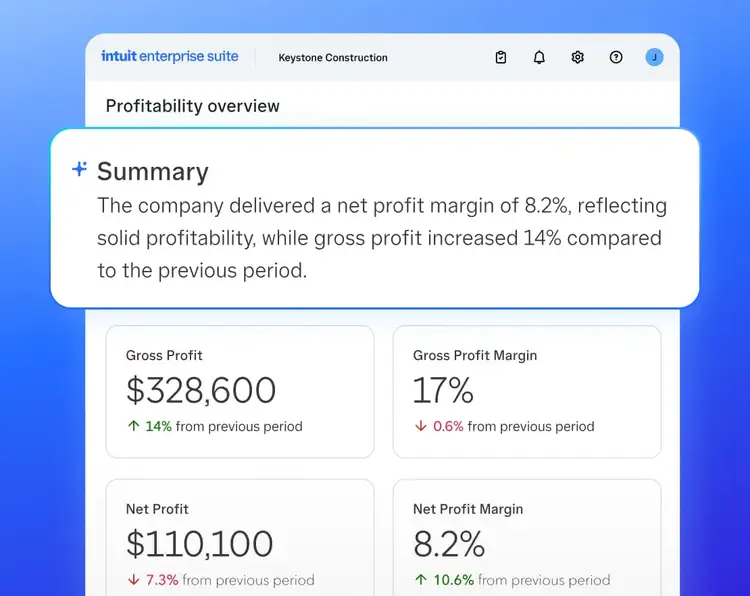
Stay ahead of job performance
Monitor budget vs. actuals and WIP in real time to spot drift early and act before it wipes out profit.

Supports shorter time from invoice to payment
Intuit customers using AIA-style invoicing got paid within 30 days at a 32% higher rate than those using standard invoicing.¹
Built for how construction actually works
Monitor job performance
Monitor and manage job performance in real time
- Drill into costs by phase and cost group to pinpoint where action is needed.
- Keep approved change orders reflected in budgets and billing, so the profit picture stays current.
- Streamline monthly WIP reporting with AI-assisted updates, exception flags, and review.
BETA COMING SOON
WHY IT MATTERS
Monitor budget vs. actuals and WIP in real time to spot drift early and act before it wipes out profit. Keep change orders connected to job financials, so performance stays current as the project evolves.
MANAGE CASH FLOW
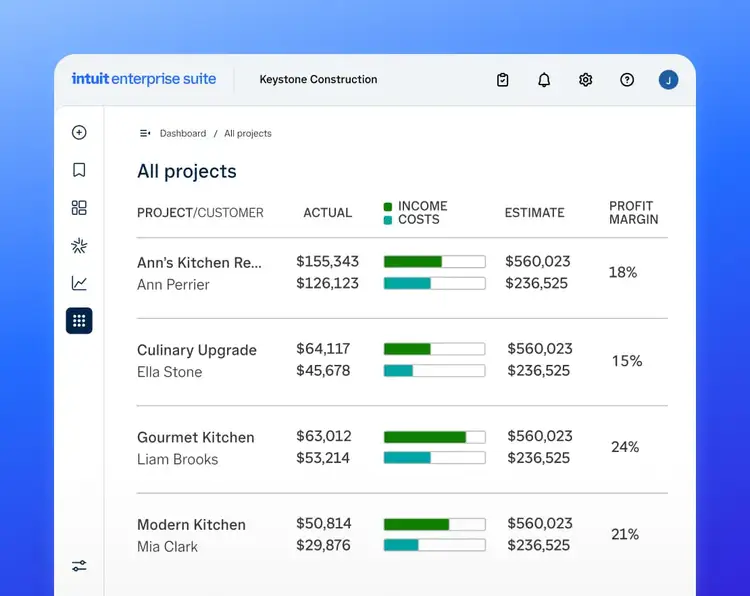
Keep money moving across every job
- Create Schedule of Values and PayApps with G702/G703 billing for
every dollar earned.
BETA COMING SOON - Turn approved change orders into billable work without losing track.
- Get invoices out quickly and schedule vendor payments on your timeline.
WHY IT MATTERS
Manage AR and AP together, securely—send AIA-style progress invoices, manage retainage (currently in beta coming soon*), get paid faster,¹ and schedule and pay vendors & subs—all with a clear view of money coming in and going out.
ONE CONNECTED PLATFORM
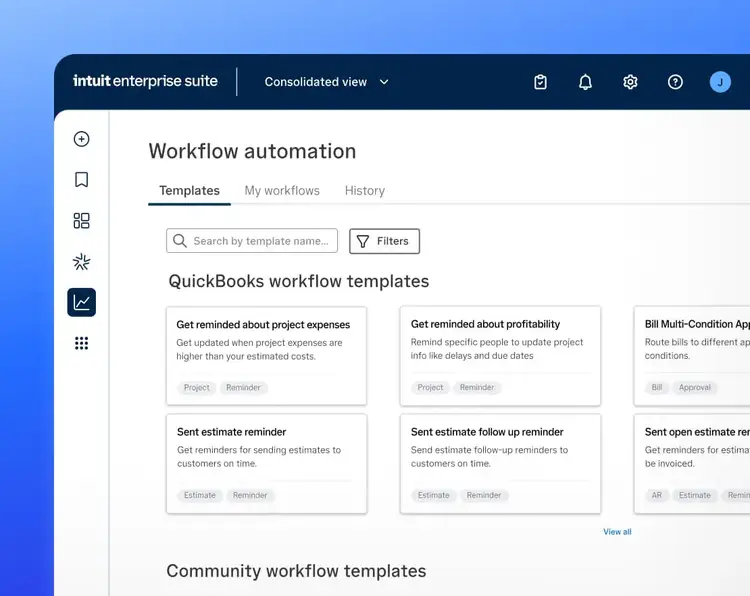
A single workflow, no switching tools
- Go from budget to estimate to invoice—no data re-entry
- Spend less time on the back office
- Scale with financial control
WHY IT MATTERS
Everything from accounting to payroll, payments, and 1099s can stay connected, so you have end-to-end financial visibility and less room for errors.
Construction firms like yours choose
Intuit Enterprise Suite
Real customers
Intuit Enterprise Suite for construction finally connects how construction companies do business as well as manage money.”
Scott Franchini
Partner, RedHammer Construction Accounting Management

Real customers
Intuit Enterprise Suite allows us to capture all of the activities and people in a very complex business. It allows us to manage them all in one place.”
Jason Corby
Founder & CFO, HFMM Legacy Group

Real customers
Intuit brings a whole shelf of assets and tools that Houzz could not get under one roof anywhere else.”
Andie Nelson
Accounting Integration Expert, Houzz

Real customers
It takes much less interaction into getting that coded against a project and a cost code. So it saved my team a significant amount of time.”
Billy Jones
CFO, Southern Brothers Construction

Connects with the tools you already use—and more




Power up profitability for your construction business
Learn how Intuit Enterprise Suite helps you protect your margins, control costs, and manage cash flow in real time—from bid to closeout.
Frequently asked questions
Intuit Enterprise Suite helps you deliver on budget with cross-portfolio visibility from a single dashboard. You can monitor your entire business alongside all your projects, as well as overall profitability using reports and integrations purpose-built for construction businesses. Run reports ready-made for construction, or choose from 15 new reports.
You can also save time by managing multiple users, entities, locations, and subsidiaries from a single sign-in, plus, create intercompany transactions with automatic eliminations and see consolidated reports across your business.
Multi-dimensional reporting lets you streamline key decisions. Use standard reports, or leverage real-time insights to create investor-ready reports with up to 20 dimensions. You can also consolidate and categorize data across payments and accounting by line item and easily populate comprehensive reports.
AI-powered recommendations based on your business’ project income and cost data give you deeper project profitability insights, and click down using industry-tailored reports, KPIs, and third-party integrations with top industry apps like Knowify, BigTime, and Houzz Pro.
Real-time job costing, profitability monitoring, and detailed reporting with custom fields let you set project goals and manage project profitability. Rich, transaction-level data and reports filtered by project manager give you the info you need to make faster decisions.
A dedicated team of experts helps ensure your migration is done right. From Day 1, a customer success manager and implementation consultant are there—from data migration to training and onboarding—to help ensure a successful migration, included at no cost for simple migrations.**
Our experts will review your data to help ensure that migration leaves nothing behind. If your migration requires complex integrations or 3rd party tools, our professional services team will provide you with additional options.
To learn more about the migration and implementation process, click here.
Money movement services are provided by Intuit Payments Inc., licensed as a Money Transmitter by the New York State Department of Financial Services. For details about our money transmission licenses, or for Texas customers with complaints about our service, please click here.
**Features
Features in beta are subject to change or discontinue at any time, and Intuit may introduce fees or other pricing requirements for such features in the future.
Data migration: Data migration is currently available for a limited time at no additional cost only to existing QuickBooks Desktop or Enterprise customers who are migrating to Intuit Enterprise Suite. A consultation is required. Some data may not be eligible for migration. Pricing, terms, conditions, special features and service options are subject to change without notice. Additional data migration services may be available at additional cost through third-party partners.
#Claims
1.Based on Intuit analysis of invoice payment data from QuickBooks Online Advanced and Intuit Enterprise Suite construction customers, Feb–Jul 2026, using a matched merchant-customer-week design. Individual results may vary.
Testimonials
Customer results are based on their unique experiences and may not be representative of all customers. Individual results may vary.