Predictive analytics models: How to use predictive analytics to forecast & flag trends

Key takeaways:
- Predictive analytics enables businesses to forecast demand, optimize inventory, and allocate resources effectively.
- Predictive analytics uses historical data to help identify potential risks such as equipment failures or customer churn.
- Solutions like IES integrate AI-powered forecasting tools for accurate financial projections, aiding in better budgeting and strategic decision-making.
Running a business often feels like trying to drive in the fog. If you miss a turn or hit a bump, the consequences can be expensive. But what if you could see problems before they happen, and fix them before they cost you?
According to the QuickBooks Business Solutions survey, 86% of respondents prioritize increased revenue and profitability, showing that businesses see clear value in forecasting their way to growth.
Predictive analytics (PA) can help you with that by turning your existing data into a helpful roadmap—one that flags risks early, highlights trends, and gives you more control over what happens next.
In this article, we’ll explore predictive analytics, how it works, where it's already helping teams like yours, and how to make the most out of it.
What is predictive analytics, and how does it work?
Predictive data analytics is a way to use your existing data to guess what might happen next in your business. Think of it like checking the weather forecast before heading out, but your “forecast” is built from sales records, customer behavior, and other business data you already have.
AI predictive analytics transforms raw data through a five‐stage process to generate reliable forecasts from historical and real-time inputs.
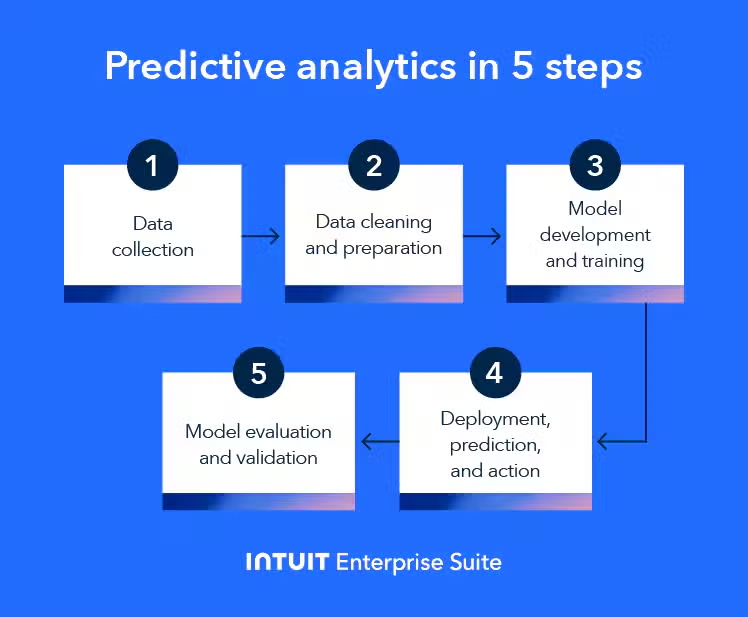
1. Data collection
Data collection is about combining the raw materials for predictive models—everything from neatly organized tables to loose text or images. Structured data fits cleanly into databases or spreadsheets, while unstructured data includes items like customer reviews or social media posts.
Common sources include CRM systems for customer interactions and ERP platforms for financial and inventory records. You can also use website and application analytics, IoT devices and sensors, social media platforms, public datasets, and transactional systems.
2. Data cleaning and preparation
Quality models start with quality data. Data cleaning and preparation can consume a majority of the project’s time because predictive accuracy hinges on error-free inputs.
Key activities include:
- Handling missing values through imputation or removal
- Correcting inconsistencies
- Eliminating duplicates
- Transforming data via normalization or scaling.
It also includes formatting everything into a model-ready structure.
3. Model development and training
In this phase, you select the right predictive technique. For example:
- If you want to forecast next quarter’s revenue, use linear regression. It fits a straight line through past sales data to predict future values.
- If you need to decide yes/no outcomes, like approving a loan, choose a classification tree. It splits decisions on applicant attributes in a flowchart structure.
This alignment ensures you use the simplest technique that captures your data’s patterns and meets your business use case.
You then train the model on your prepared dataset, typically splitting it into training (to teach the model) and testing (to challenge the model) subsets. This ensures you don’t just memorize past data—a problem called overfitting, where a model fits noise instead of real trends.
4. Model evaluation and validation
After training, you must rigorously assess performance using a separate test dataset that the model has never seen.
Common metrics include:
- Accuracy: The fraction of correct predictions over all cases
- Precision: Among predicted positives, the share that are true positives
- Recall: The percentage of all true positive cases that the model correctly identifies
These metrics help you confirm the model is both reliable and fit for purpose before moving to production.
5. Deployment, prediction, and action
You deploy a validated model into the production environment, where it ingests new data and generates real-time or batch predictions.
You must then translate these forecasts into business action—adjusting inventory levels, targeting customers with promotions, or flagging potential risks. Continuous monitoring ensures the model remains accurate as new patterns emerge.
Predictive analytics vs. machine learning
Machine learning (ML) and predictive analytics often combine data into insights. ML gives you the algorithms that learn patterns from data. PA uses those algorithms—plus statistics and historical data—to forecast what happens next and guide decisions.
Together, they help you move from understanding past performance to planning future actions.
PA is similar to enterprise business intelligence in many ways. It collects, analyzes, and visualizes business data to help you make informed decisions.
Here’s a quick refresher on the differences between ML and PA:
And here’s what the analytics continuum includes:
- Descriptive analytics: Answers “What happened?” by summarizing historical data.
- Diagnostic analytics: Explains “Why did it happen?” by finding root causes.
- Predictive analytics: Forecasts “What is likely to happen?” using ML models and statistics.
- Prescriptive analytics: Advises “What should be done?” by combining predictions with optimization.
Together, these layers give a complete picture. You see past trends, understand causes, predict what’s next, and decide your best action.
Pros and cons of using predictive analytics
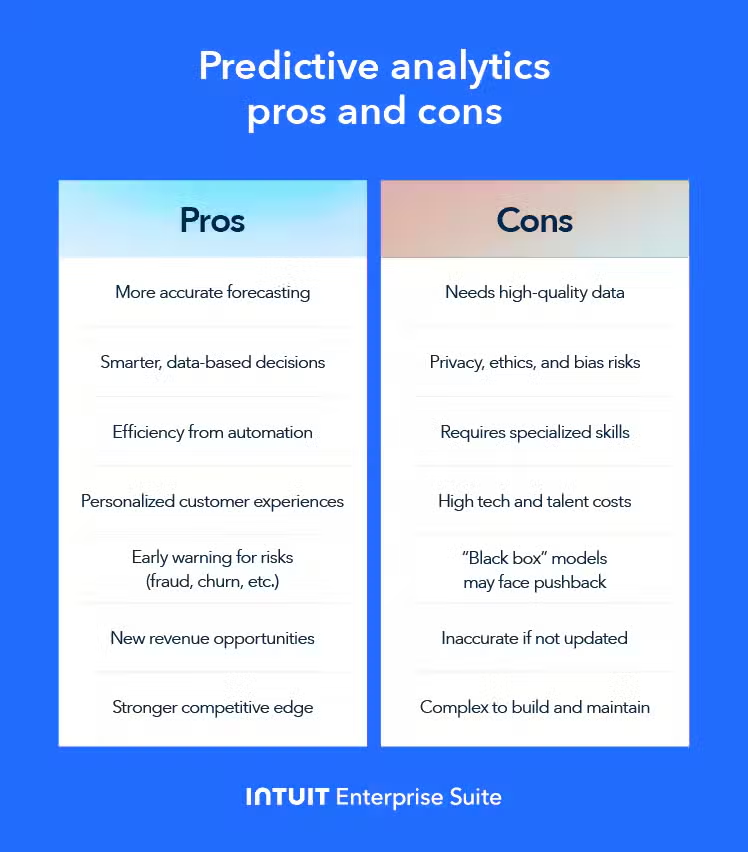
Predictive analytics can power smarter decisions and uncover new opportunities, but it also brings hurdles you need to plan for. Here’s a quick overview of its main benefits and key challenges:
Benefits of using predictive analytics
Predictive analytics helps you look ahead with confidence and act on solid data by offering:
- Improved accuracy in forecasting and planning, so you canhit your targets more often when you base plans on reliable predictions
- More informed, data-driven decision-making to replace guesswork with facts to guide strategy
- Increased operational efficiency and automation, saving time and cutting costs by automating routine tasks
- Enhanced customer understanding, personalization, and retention to help you tailor offers that keep people coming back
- Proactive risk identification and mitigation to spot fraud, churn, or failures before they hit you
- New business opportunities or revenue streams, allowing you to uncover growth areas hidden in your data
- A competitive advantage to get you a step ahead by acting on insights faster than others
Challenges and criticisms of predictive analytics
Predictive analytics delivers power, but it demands resources, skills, and strong governance.
Here’s what you should be mindful of while using PA:
- It requires high-quality, relevant, and sufficient data.
- You must guard against bias and protect customer information.
- Building and tuning models can take time and expertise.
- You may need data scientists or analysts on board.
- Licenses, hardware, and salaries add up.
- There’s a potential for inaccurate predictions if models are poorly built or data changes.
- You might face difficulty interpreting “black box” models—complex algorithms can be hard to explain to stakeholders.
- There might be some resistance to change or a lack of trust in insights— teams may doubt models and stick to old habits.
By pairing each challenge with a concrete solution, backed by key supports, you can harness predictive analytics safely and effectively.
Here’s what you can do:
- Governance: Define clear policies, roles, and review cycles.
- Pilot programs: Start small with measurable goals before scaling.
- Skill development: Train your team and bring in experts as needed.
- Monitoring and maintenance: Track model health, detect drift, and retrain.
- Change management: Share early wins and empower data champions.
Applications and examples of predictive analytics
Just like ERP data analytics, predictive analytics delivers real value across many industries and business functions. It helps you spot trends, prevent problems, and make smarter decisions. Below are some key use cases and predictive analytics examples to spark ideas for your own team.
Marketing and sales
Predictive analytics helps you find and keep valuable customers. You can sort leads by how likely they are to buy. You can also tailor messages to hit the right note at the right time.
In marketing and sales, PA helps you:
- Predict customer churn and lifetime value
- Score and prioritize leads
- Optimize campaign spend and timing
- Personalize product recommendations and offers
Retail
You can use predictive models to keep your shelves stocked and your prices competitive. You can predict when demand will spike and adjust inventory or promotions ahead of time.
Predictive data analytics helps retailers:
- Forecast demand for inventory management
- Optimize pricing strategies and promotions
- Segment customers for targeted marketing
- Predict store foot traffic
Finance and banking
Banks and finance teams use predictive analytics to manage risk and spot fraud fast. You can fine-tune credit decisions and detect unusual transactions as they happen.
In finance and banking, AI predictive analytics is key to:
- Assessing credit risk and scoring loan applicants
- Driving algorithmic trading and market forecasts
- Detecting fraudulent transactions
- Analyzing customer spending patterns
Supply chain and manufacturing
Predictive analytics keeps your machines running and your goods moving. You can fix equipment before it fails and reroute shipments around delays. You can use it with your manufacturing execution system (MES) to boost efficiency.
Predictive analytics in supply chain and manufacturing lets you:
- Schedule predictive maintenance for equipment
- Optimize logistics routes and delivery times
- Forecast supply chain disruptions
- Balance inventory levels
Human resources
HR teams use predictive models to build stronger, happier teams. You can spot flight risks before top talent walks out the door and match candidates to roles where they’ll thrive. This makes human capital management (HCM) way easier.
Predictive data analytics empower your HR department with the right data to:
- Predict employee attrition and turnover
- Identify drivers of performance
- Optimize workforce planning and scheduling
- Screen candidates and forecast job success
Security
Predictive analytics helps security teams stay one step ahead of threats. You can flag risky behavior and strengthen defenses before an attack lands.
With PA, your security teams can:
- Predict and prevent cybersecurity attacks, such as malware and phishing
- Spot insider threat patterns
- Forecast crime hotspots for law enforcement
Underwriting and insurance
Insurers lean on predictive models to set fair prices and catch bogus claims. You can balance risk and reward to keep policies profitable and customers happy.
In underwriting and insurance, predictive analytics helps you:
- Assess applicant risk for new policies
- Predict the likelihood and cost of future claims
- Detect fraudulent claim submissions
- Optimize premium pricing
All of this helps you make better, more confident decisions to help scale your company.
Types of predictive analytics models
Different predictive tasks call for various kinds of models. Some models sort things into buckets, others draw trend lines, and others find hidden groups or mimic how a brain learns.
The type of output—class labels, numerical estimates, cluster IDs, or sequential forecasts— also matters because it shapes how you interpret results, choose visualizations, and tie predictions directly into business actions.
Choosing the right type helps you get the clearest, most useful forecasts for your business.
Classification models
Classification models sort new data into discrete buckets. You might use one to flag an incoming email as spam or not, or predict whether a customer will churn or stay. The model learns from past examples of each class in each case and then decides where new cases belong.
Clustering models
Clustering models look for natural groupings in your data without any labels. They’re great for customer segmentation—say, grouping shoppers by their buying habits—so you can tailor marketing or product offers to each segment’s unique preferences.
Regression models
Regression models forecast a continuous number, like sales revenue or temperature. For example, you could feed last year’s monthly sales into a regression model and get a prediction for next month’s sales figure. This helps with revenue recognition and inventory or staffing planning.
Time series models
Time series models focus on data that’s ordered by time. They pay special attention to trends, cycles, and seasonal patterns. For instance, you can predict next week’s website traffic by training on your daily visitor counts over the past year.
Decision trees
Decision trees split data step by step, asking a simple question at each node (e.g., “Is credit score above 700?”) until they arrive at a decision or value.
You can use them for both classification (like approving/denying a loan) and regression (predicting how much a loan will cost).
Neural networks
Neural networks use layers of interconnected neurons to learn extremely complex relationships in large datasets. They excel at tasks like advanced fraud detection or image-informed forecasting, where traditional models might miss subtle patterns.
Key features to look for in predictive analytics tools
To turn your predictive insights into real business value, you need more than models—you need systems that handle data, planning, and execution in one place.
Integrating predictive analytics with enterprise platforms ensures you feed clean data into your models and act on forecasts without jumping between predictive analytics tools. Here are a few main things you should look for in a PA tool.
Unified data management and reporting capabilities
You can’t predict accurately without clean, accessible data. A unified data management platform pulls information from CRM tools, different ERP systems, web analytics, and more into a single source of truth. Built-in reporting then lets you track both the quality of your model inputs and the real-world impact of your predictive insights.
AI-powered forecasting and financial planning
When predictive models output sales forecasts or demand predictions, you want them to flow directly into your financial plans. Modern financial planning and analysis tools embed AI forecasting alongside business intelligence and budgeting, so you adjust revenue targets and expense plans based on near-term predictions.
By linking forecasts to planning modules, you turn insights into budgets and strategic roadmaps without error-prone exports and imports.
Features for automating financial workflows and payments
Predictive scores—like cash-flow forecasts or risk ratings—must trigger actions automatically to maximize ROI. Automation tools can time payments to optimize working capital, route high-risk transactions for manual review, or adjust credit terms based on predicted customer behavior.
Embedding these features in your finance platform means you act on insights instantly, not days later.
Integrated workforce management features
Your people are as critical as your processes. Workforce management modules that tie into demand forecasts let you staff shifts before peaks or flag potential attrition risks automatically.
With a single platform—like Intuit Enterprise Suite—you can seamlessly move from predicting staffing needs to scheduling, recruiting, and retention efforts.
Boost productivity and enhance profitability
Predictive analytics transforms business operations by enabling accurate forecasting, resource optimization, and proactive decision-making. By analyzing historical data, you can anticipate future trends, reduce risks, and enhance customer satisfaction, which leads to increased productivity and profitability.
The financial management solution, Intuit Enterprise Suite (IES), integrates these predictive capabilities into a unified platform, offering AI-powered forecasting, real-time analytics, and automated financial planning tools.
With IES, you can seamlessly convert insights into actionable strategies, streamlining operations and driving growth. Discover how IES can elevate your business.